
Basic operation
Click on the button to see its function description and related info.
Start the operation.
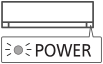
When the unit is ON, the POWER indicator lights up.
When the unit is ON,  disappears from the remote control display.
Hint:
Hover over the OFF icon to see it disappear from the remote control display.
Select the desired mode.
Press repeatedly to cycle through the modes.
The selected mode appears on the display.
Hint:
Hover over the mode icon to see it appear on the remote control display.
Select the desired temperature.
Selection range: 16.0 °C ~ 30.0 °C / 60 °F ~ 86 °F.